KINGSTAR
KINGSTAR is comprised of several components. We'll look at them one by one.
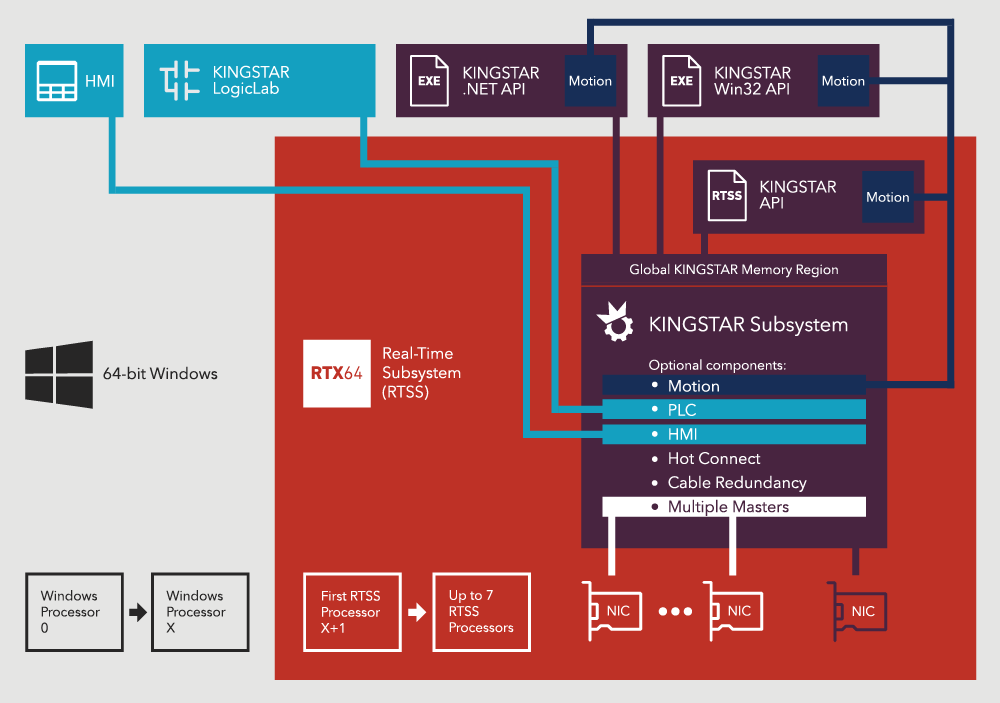
KINGSTAR Subsystem
KINGSTAR Subsystem contains several components:
Fieldbus
Fieldbus is the basic component of KINGSTAR Subsystem. It is a communication and configuration library that encapsulates all of KINGSTAR’s EtherCAT features. Fieldbus links directly to and controls an NIC that is used for all EtherCAT network activity. It is responsible for sending and receiving packets on the NIC. When Fieldbus starts, it scans its EtherCAT network, finds the hardware that is available on the network and configures devices automatically. Once Fieldbus is started, the hardware is ready for use.
The EtherCAT real-time data is stored in cyclic packets. You can use the Fieldbus API functions to access the variables within the packets that contain real-time data. Fieldbus hides the complexity of EtherCAT and presents the CANopen interface of CANopen over EtherCAT (CoE) drives. With Fieldbus you don't need to know where the variables are, the differences among vendors' hardware, or how the synchronization is handled. Fieldbus does the work for you.
Motion
Motion acts like a motion control card. The difference is that it is software, which can be used with a variety of hardware and allows for the use of a common programming language to develop your motion applications. The interface provided by Motion to control the axes follows the PLCopen Motion Control standard.
The Motion architecture allows multiple applications to run using the same EtherCAT link. Some of them can be Windows, and some can be real-time. This means you can control multiple work stations on one machine. You can divide your machine into multiple stations and use each application to control each station. All of them runs on top of Motion and the same EtherCAT bus on the same computer. This way, you can develop applications in different environments using different languages for each part of your machine depending on your needs. Engineers can work on their programs without worry of interference.
NOTE: If multiple KINGSTAR applications are running at the same time, stop the KINGSTAR Subsystem after you close the last application. If you have applications linking to the KINGSTAR Subsystem and you close the Subsystem, it may cause your computer to become unstable.
Interfaces
KINGSTAR offers a few interfaces for application development:
- RT
- Win32 (Windows API)
- .NET
- PLC
Each of them can access the KINGSTAR library. All the applications created from these interfaces can synchronize using the global KINGSTAR memory region. RT and Win32 use C/C++, .NET uses C# and VB, and PLC uses the programming languages defined by IEC 61131-3. For PLC, the KINGSTAR function blocks can be accessed through KINGSTAR LogicLab.
Hot Connect
The EtherCAT Hot Connect feature allows hardware to be added while the EtherCAT network is already running. As KINGSTAR uses auto-configuration, it detects added hardware and configures it automatically. Once the new hardware is configured, it becomes available to the application.
Multiple Masters
The Multiple Masters feature allows you to create multiple KINGSTAR instances and use them to control different network cards at the same time. This feature can be enabled using the parameter in the Create function.
Global KINGSTAR memory region
Because KINGSTAR allows you to connect to the Subsystem through multiple applications developed in different languages, you need a simple way for these applications to communicate with each other. The solution is the global KINGSTAR memory region, which is controlled by KINGSTAR Subsystem. Inside this memory space, you can read and write any variable without knowing where that variable is. All the interfaces – RT, Win32, PLC, and Windows .NET – have APIs to access the global KINGSTAR memory region. You can have multiple applications sharing variables, even though they are on Windows and RTX64 and using different languages.
Interpolation and PID
Machine or Robot controllers need interpolation and PID to control the motors. With Motion, you can decide whether these features are done by your application, the KINGSTAR Subsystem, or the servo drive on a per-axis basis. If you do not want to do the interpolation and PID in your application, the features inside the KINGSTAR Subsystem allow you to have the same configuration options for all motors no matter the type (linear, servo, or stepper) or brand.
For example, if you want to build a robot, you need a robot controller. This controller can be a real-time application developed in C/C++ using Motion that does interpolation itself to control the six axes plus one or two I/O boards. There is a PLC on the side that allows an end user or system integrator to add more hardware, I/Os, or motors to the system control them through the PLC, and synchronize them with some other applications either on Windows or on different machine.
NOTE: Interpolation and PID are typically real-time functions which run every cycle. Therefore they should run in a real-time application rather than a Windows application.