自訂虛擬馬達
自訂虛擬馬達(Custom Simulated Motor)功能允許使用者在 KINGSTAR 的虛擬軸上模擬自訂馬達行為。要使用此功能,使用者必須準備一個使用者應用程式以及一個自訂虛擬馬達 RTDLL。KINGSTAR 提供了一組 API 與實作範例,以支援使用者開發應用程式與自訂 RTDLL。
注意:自 KINGSTAR 4.5.4 及以後版本支援自訂虛擬馬達功能。
本節內容:
工作流程
以下為使用自訂虛擬馬達功能的基本流程:
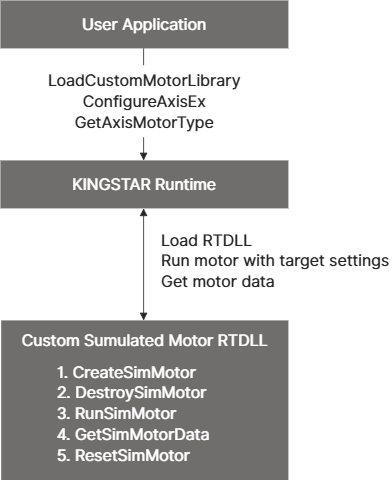
- 建立使用者應用程式
使用下列 API 來建立自訂應用程式,詳細資訊請參閱「在 KINGSTAR 中使用自訂虛擬馬達」中的 C++ 與 .NET 實作範例:- LoadCustomMotorLibrary:將自訂虛擬馬達 RTDLL 載入 KINGSTAR。
- ConfigureAxisEx:配置虛擬軸的設定,並將該軸關聯到自訂虛擬馬達。
- GetAxisMotorType:檢查虛擬馬達類型。
- KINGSTAR Motion APIs:與自訂虛擬馬達進行互動。
- 實作自訂虛擬馬達 RTDLL
- 為了在 KINGSTAR 中使用自訂虛擬馬達,必須將其實作為 RTDLL。其中,RTDLL 必須實作以下函式,以便 KINGSTAR 載入並執行馬達虛擬行為。有關實作的詳細資訊,請參閱「在 RTDLL 中實作自訂虛擬馬達」。
需求函式:CreateSimMotor, DestroySimMotor, RunSimMotor, GetSimMotorData, ResetSimMotorData 點擊以查看程式碼片段複製
// Create simulated motor that will be used by KINGSTAR motion runtime.
//
// Parameters:
// * Index: Axis index
// * SimulatedAxisDetails: Pointer to a structure that contains simulated axis details
//
// Returns: Handle to custom simulated motor
__declspec (dllexport) HANDLE __stdcall CreateSimMotor(
size_t Index, const McSimulatedAxisDetails* SimulatedAxisDetails);
// Destroy simulated motor. This function will be used when KINGSTAR motion runtime cleans up its
// internal resource, and you can use it to clean internal simulated motor resources.
//
// Parameters:
// * MotorHandle: Simulated motor handle
__declspec (dllexport) void __stdcall DestroySimMotor(HANDLE MotorHandle);
// Run simulated motor. This function will be used by KINGSTAR motion runtime to run your
// simulated motor logic.
//
// Parameters:
// * MotorHandle: Simulated motor handle
// * ControlMode: Axis control mode
// * TargetPosition: Interpolated position when axis is run in position mode, unit: count
// * TargetVelocity:
// - Interpolated velocity when axis is run in position mode, unit: count/s
// - PID velocity when axis is run in velocity mode, unit: count/s
// * TargetTorque: PID torque when axis is run in torque mode, unit: % of rated torque
// * TorqueOffset: Torque offset, unit: % of rated torque
__declspec (dllexport) void __stdcall RunSimMotor(
HANDLE MotorHandle,
McControlMode ControlMode,
double TargetPosition,
double TargetVelocity,
double TargetTorque,
double TorqueOffset
);
// Get data from simulated motor. This function will be used by KINGSTAR motion runtime to
// get simulated data.
//
// Parameters:
// * MotorHandle: Simulated motor handle
// * ActualPrimaryPosition: Output pointer of actual primary position, unit: count
// * ActualSecondaryPosition: Output pointer of actual secondary position, unit: count
// * ActualVelocity: Output pointer of actual velocity, unit: count/s
// * ActualTorque: Output pointer of actual torque, unit: % of rated torque
__declspec (dllexport) void __stdcall GetSimMotorData(
HANDLE MotorHandle,
double* ActualPrimaryPosition,
double* ActualSecondaryPosition,
double* ActualVelocity,
double* ActualTorque
);
// Reset motor data. This function will be used when axis state is axisDisabled or axisStandstill.
// It can be used to reset internal variables in simulation logic.
//
// Parameters:
// * MotorHandle: Simulated motor handle
// * AxisState: Axis state
__declspec (dllexport) void __stdcall ResetSimMotorData(HANDLE MotorHandle, AxisState AxisState);
- KINGSTAR Motion 將透過 RunSimMotor 傳遞運動目標設定給 RTDLL,以執行自訂虛擬馬達。
- KINGSTAR Motion 將透過 GetSimMotorData 從自訂虛擬馬達擷取實際數據。
- 為了在 KINGSTAR 中使用自訂虛擬馬達,必須將其實作為 RTDLL。其中,RTDLL 必須實作以下函式,以便 KINGSTAR 載入並執行馬達虛擬行為。有關實作的詳細資訊,請參閱「在 RTDLL 中實作自訂虛擬馬達」。
在 RTDLL 中實作自訂虛擬馬達
概述
若要將自訂虛擬馬達與 KINGSTAR 整合,您必須將其實作為 RTDLL,以使 KINGSTAR 能夠載入並執行馬達虛擬行為。
注意:請確保 RTDLL 實作不會產生錯誤,且不建議在 RTDLL 中使用 KINGSTAR API。開發前請詳閱「重要指引」。
開始使用
- 使用 KsUserApp 範例程式碼(請聯繫 KINGSTAR 技術支援 以取得 KsUserApp)。
- 導覽至 KsCustomSimulatedMotorRTDLL 專案,作為參考實作。
專案結構
| 檔案 | 用途 | 是否需要修改 |
|---|---|---|
|
DllMain.cpp |
RTDLL 入口點 |
不可修改 |
|
CustomSimulatedMotorRTDLL.h |
整合至 KINGSTAR 的函式宣告 |
不可修改 |
|
CustomSimulatedMotorRTDLL.cpp |
使用 BasicSimulatedMotor 的範例實作 |
可依需求自訂 |
|
BasicSimulatedMotor.h |
基本虛擬馬達類別宣告 |
可依需求自訂 |
|
BasicSimulatedMotor.cpp |
基本虛擬馬達類別實作 |
可依需求自訂 |
實作步驟
- 分析範例程式碼:
審閱範例實作以了解整體結構與工作流程。 - 修改 RTDLL 實作:
使用您的自訂馬達邏輯更新 CustomSimulatedMotorRTDLL.cpp。 - 實作馬達行為:
自訂 BasicSimulatedMotor.h 與 BasicSimulatedMotor.cpp 以符合您的馬達特性。
重要指引
開發您的 RTDLL 實作時,請遵守以下要求:
- 無錯誤執行:
實作絕不能產生錯誤或拋出異常。 - API 限制:
不建議在 RTDLL 中使用 KINGSTAR API。 - 編譯設定:
建議在量產(Release)模式下編譯 RTDLL,以確保在生產環境中獲得最佳效能。
在 KINGSTAR 中使用自訂虛擬馬達
此章節說明如何使用 KINGSTAR C 與 .NET API 整合並執行自訂虛擬馬達,以下為整合標準流程:
- 初始化 KINGSTAR 子系統:
使用 Create 建立 KINGSTAR 環境。 - 載入自訂馬達函式庫:
呼叫 LoadCustomMotorLibrary 並提供 RTDLL 路徑。成功回傳後,會取得該 RTDLL 的函式庫 ID。 - 設定虛擬軸:
使用 SetConfiguredAxesCount 定義虛擬軸數量。 - 配置軸設定:
呼叫 ConfigureAxisEx 將軸與您的自訂虛擬馬達關聯。
注意:.NET API 中對應函式名稱為 ConfigureAxis。 - 設定運動參數:
依需求設定軸運動參數。 - 執行馬達虛擬行為:
執行虛擬軸測試實例。 - 清除:
執行完成後,停止並銷毀 KINGSTAR 子系統。
C++ 與 .NET API 範例專案提供詳細的實作範例,請見以下內容。
C++ 實作範例
開始使用
- 使用 KsUserApp 範例程式碼(請聯繫 KINGSTAR 技術支援 以取得 KsUserApp)。
- 開啟 KsCustomSimulatedMotorAppCPP 專案。
專案元件
| 檔案 | 用途 | 是否需要修改 |
|---|---|---|
|
CustomSimulatedMotorApi.h |
自訂虛擬馬達 API 宣告 |
不可修改 |
|
main.cpp |
完整流程範例 |
可依需求自訂 |
執行 C++ 範例
- 設定 KINGSTAR Runtime 環境:
- 從 KINGSTAR 控制台開啟 Runtime 設定。
- 若已將 NIC 指派給 KINGSTAR,請釋放它以確保 KINGSTAR 在虛擬模式下執行。
- 準備您的 RTDLL:
- 編譯 KsCustomSimulatedMotorRTDLL 專案。
- 將編譯好的 RTDLL 部署至您的目標目錄。
- 設定範例專案:
- 在 Visual Studio 中開啟範例專案。
- 將 CUSTOM_SIMULATED_MOTOR_RTDLL_FILE_PATH 常數更新為指向您 RTDLL 的絕對 ASCII 路徑。
- 編譯並執行:
- 編譯範例專案。
- 執行執行檔並驗證主控台輸出。
建立自訂 C++ 應用程式
- 產生專案範本:
使用 RTX64 Project Wizard 建立一個新的 C++ 專案。 - 設定連結器相依性:
- WIN32 配置:在連結器設定中加入 ksapi.lib。
- RTSS 配置:在連結器設定中加入 ksapi_rtss.lib。
- 匯入 API 標頭檔:
從範例專案中將 CustomSimulatedMotorApi.h 複製到您的專案中。 - 實作您的邏輯:
以範例工作流程為基礎,根據您的特定需求自訂馬達測試邏輯。
.NET 實作範例
以下範例使用 KINGSTAR .NET Local API。
開始使用
- 使用 KsUserApp 範例程式碼(請聯繫 KINGSTAR 技術支援 以取得 KsUserApp)。
- 開啟 KsCustomSimulatedMotorAppDotNet 專案。
專案元件
| 檔案 | 用途 | 是否需要修改 |
|---|---|---|
|
Program.cs |
完整工作流程範例 |
可依需求自訂 |
執行 .NET 範例
- 設定 KINGSTAR Runtime 環境:
- 從 KINGSTAR 控制台開啟 Runtime 設定。
- 若已將 NIC 指派給 KINGSTAR,請釋放它以確保 KINGSTAR 在虛擬模式下執行。
- 準備您的 RTDLL:
- 編譯 KsCustomSimulatedMotorRTDLL 專案。
- 將編譯好的 RTDLL 部署至您的目標目錄。
- 設定範例專案:
- 在 Visual Studio 中開啟範例專案。
- 將 CUSTOM_SIMULATED_MOTOR_RTDLL_FILE_PATH 更新為指向您 RTDLL 的絕對 ASCII 路徑。
- 編譯並執行:
- 編譯範例專案。
- 執行執行檔並驗證主控台輸出。
建立自訂 .NET 應用程式
- 產生專案範本:
使用 Visual Studio 建立一個新的 .NET 專案。 - 設定引用:
- 對於使用 KINGSTAR .NET Local API 的專案,加入:
- IntervalZero.KINGSTAR.Base
- IntervalZero.KINGSTAR.Local
- 對於使用 KINGSTAR .NET OpcUa API 的專案,加入:
- IntervalZero.KINGSTAR.Base
- IntervalZero.KINGSTAR.OpcUa.Client
- 對於使用 KINGSTAR .NET Local API 的專案,加入:
- 實作您的邏輯:
以範例工作流程為基礎,根據您的特定需求自訂馬達測試邏輯。