Allows you to select an axis mode, a device and its control mode. Also it shows its position, velocity, and torque.

|
Top areaDepends on the type of license you have, you will see all or part of the configuration tabs of Configure, Test, Tune, IO and SDO. Click each tab to configure its settings. Mode: the axis mode. The related control mode will also be changed when changing this axis mode.
Control Mode: The target control mode when executing the movement of the axis using the Configuration Tool.
Device: the device you select from the Project Configuration list. Depends on the axis mode you select, you may see more information as following: Enable / Disable (only available for Motion mode): powers the axis on or off (servo drive). When enable (powered on), the status icon is shown as OP; when disable (powered off), the status icon is shown as Non-OP. Actual position: the actual position of the axis. When modulo axis is enabled, this value will be converted to a modulo value. Actual velocity: the actual velocity of the axis. By default, the unit is count per second. Actual torque: the actual torque of the axis. By default, the unit is percent (%). Reset position ( Alias: the Alias feature appears only when Support index alias is checked in the Options setting. It displays the alias of the device. You can configure an alias by entering an integer value between 0-255 in the input box. If you enter an alias after the EtherCAT connection is established, a Send button appears next to it. Click it to apply and save. Alias values must be unique for each device type (axes or I/Os). Do not assign the same alias to more than one device within the same device type. See Step 2-3 in Display Devices in Alias Order for more details. NOTE: After the EtherCAT connection is established, you can only modify aliases when aliases are disabled. To disable aliases, uncheck the Enable axis/IO index aliases option in the EtherCAT Settings field. |
|
|
 ): resets the actual position.
Operations Under Prohibit Use State
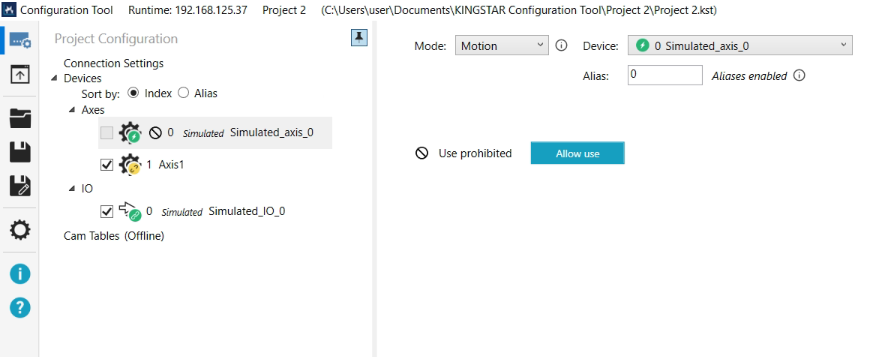
The Prohibit use function disables the axis from operation in Configuration Tool. When selected, you can only edit the axis mode, index, and alias. To exit the prohibited state, click the Allow use button.
See also